FEATURED CONTENT

Insights Report NEW

Franchise marketing research report 2026.

Franchise Guide

Franchise marketing, end-to-end: from strategy to platform choice.

Slice of Success NEW

HomeWell on keeping owners on-brand in a regulated industry.

Local Marketing Examples

15 examples of brands with great local marketing campaigns.

Platform demo POPULAR

A 30-minute tour of the Marvia platform.

Brand Localization

A short guide to Brand Localization
From storage to execution, all in one platform.

Digital Asset Management

Connect your brand assets to your entire marketing workflow.
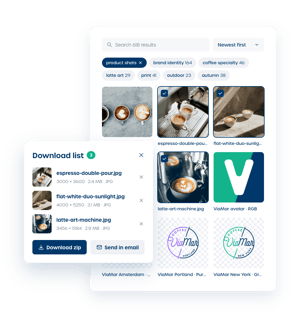
Marvia DAM assets with download list

What is Marvia's DAM?

Digital asset management for multi-location marketing teams is messy. Assets end up on desktops, in emails, and across shared drives. People use the wrong files. And then the central team gets pulled into requests they shouldn't have to field.

Marvia's DAM gives your whole network one place to find and use approved brand assets. And because it's built into Marvia, the assets connect directly to the templates and tools your partners use to create content.
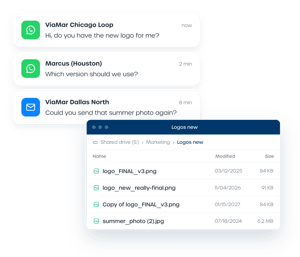
Asset problem

Give it a try


What you get

search-icon
FIND
AI tagging, color tagging, and metadata mean the right brand asset is always just a search away.
users-group-1
CONTROL
Set permissions by role or location. Everyone gets access to what they need, and nothing they don't.
link
CONNECT
Connect assets to brand templates, and Marvia DNA automatically pulls the right content.
lock-icon
PROTECT
Expiration dates, watermarks, and publication rights keep your assets from going out of date. 
New: AI Assistant

Find approved assets faster

Find any file in seconds. Search the DAM using keywords, titles, tags, or plain-language requests with the Marvia AI Assistant. Browse folders when you know where to look, or describe what you need and let the Assistant surface relevant files. Then package, share by email, or download the approved assets you find.
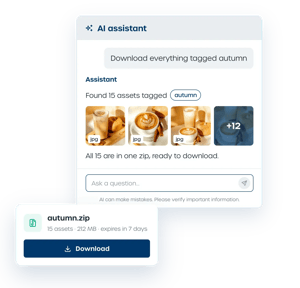
ai-assistant-download-by-tag

Easily adapt

Resize and convert assets on the fly to meet specific size and format requirements, without uploading multiple versions.
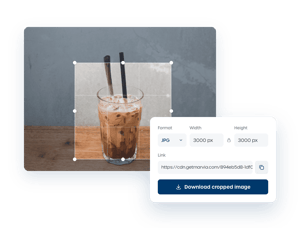
DAT crop and convert

Track performance

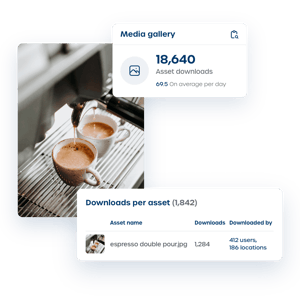
See how every brand asset is performing across your network. Track views, downloads, and top-performing files so you know what's actually getting used and can make smarter decisions about what to create next.
Marvia DAM asset performance

Open access

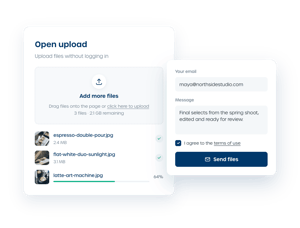
Share selected brand assets and folders publicly without requiring an account, perfect for press kits and external partners. Need to collect files from people in the field? Open upload lets collaborators add files without logging in. 
DAM Open upload

Customized permissions

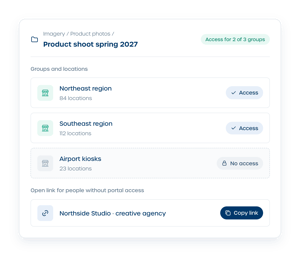
Decide exactly who can view, share, edit, or download specific assets by assigning rights to asset groups. You can adjust permissions or add new roles at any time as your network grows or changes to make brand asset management easy.
DAM roles and permissions

Valued and trusted by users around the globe

"Before using Marvia, we had a cluttered shared drive in which our departments could upload material. This resulted in an unstructured collection of folders. Customers and partners found it difficult to find the right files. That is now a thing of the past"
avatar SM
Lisanne S.Marketing Coordinator, Steve Madden Europe
"Thanks to the recognizable folder structure, our customers quickly find their way in the DAM. The Brand Portal provides a clear overview of all marketing materials and inspires customers to get started with these materials and to include new products in the range. In addition, the portal allows us to clearly see what appeals to our customers and then respond to this during the following photo shoots"
KevinMarketing Manager, Style de Vie
"We have a huge database of photos within the same categories, so it is crucial that detailed tagging is possible. Marvia’s DAM offers many features, like adding tags and photographer information, making us more efficient."
medecin du monde logo (1)
Nadia D.Network Communication Coordinator, Médecins du Monde

I want to stop wasting time

Get a live, customized product tour and we'll answer all your DAM questions and help you find out why Marvia is the right DAM for your brand.   

What can I expect?

  • Live demonstration of our platform, tailored to your specific needs
  • Answers to all your questions to make sure you have all the information you need

Fill out the form to schedule a free demo customized for your specific DAM needs.
 

Marvia DAM FAQs

What is digital asset management software for multi-location brands? It's one central place to store, manage, and share all your brand files, like logos, photos, videos, and documents, with every franchisee, dealer, or location in your network. Partners find the approved version themselves, and because role permissions are built-in, they only see what's meant for them. In Marvia, those files also go straight into your templates, so partners can turn them into ready-to-use materials in a few clicks.
Can we stop locations using licensed images after the licence expires? Yes. Give an image an expiry date, and Marvia marks it as expired as soon as the licence ends. The expiration overview shows every image that has expired or will expire in the next three months, so nothing slips through. From there, renew the rights if you've extended the licence, or delete the image so it's gone from the DAM for good. Watermarks and publication rights show everyone how an image may be used, and permissions decide which partners see it in the first place. So you deal with it before a licensed photo shows up in a local ad, not after.
Can we share brand assets with agencies or press without giving them an account? Yes. Share selected files or folders through a public link, no account needed. Only what you select is shared. Handy for press kits, agencies, and other outside partners. It works the other way too: with open upload, a photographer or agency can add files to your DAM without logging in.
Can local teams resize or convert assets themselves? Yes. Partners can crop, resize, or change the file type right in the DAM, without asking your team. Supported formats: JPG, PNG, WEBP. Need an image on a website or webshop? Use its CDN link. When you update the file, it updates everywhere it's used.
What can the Marvia AI Assistant do in the DAM? Find files by name or tag, show what was recently added or updated, download files as a zip, and email them with a note. Just type what you need. The Marvia AI Assistant is available to customers with both the DAM and Marvia AI.