FEATURED CONTENT

Insights Report NEW

Franchise marketing research report 2026.

Franchise Guide

Franchise marketing, end-to-end: from strategy to platform choice.

Slice of Success

Free webinars on franchise marketing success

Local Marketing Examples

15 examples of brands with great local marketing campaigns.

Platform demo POPULAR

A 30-minute tour of the Marvia platform.

Brand Localization

A short guide to Brand Localization
An inexpensive, quick and easy way to build beautiful responsive website pages without coding knowledge
Lock your brand. Unlock your locations.

Dynamic Templates

Give everyone the power to create on-brand marketing materials, without routing through the central marketing team.
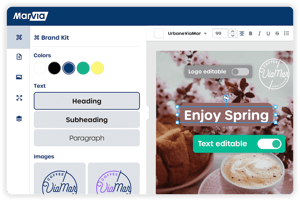
Marvia brand templates visual editor

What is it?

Give your partners the ability to create on-brand marketing materials instantly, without design skills or waiting on the central marketing team.

Start by building customizable templates for social, print, and digital content. Create the template directly in the platform or upload a PDF or InDesign file, lock down your brand elements, and then your partners customize what matters for their market. Add an approval workflow, so the right person reviews content before it goes live.

Marvia DNA automatically pulls in custom data like addresses, pricing, and imagery based on each user's profile, so there's no manual data entry or room for error.
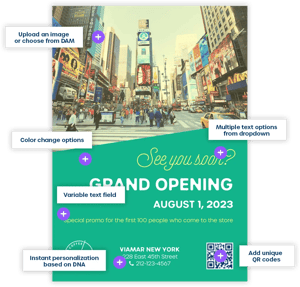
template with customization options

Give it a try


Benefits of Dynamic Templates

Maintain consistency

Your brand looks and feels the same no matter who creates the content. Templates can be as open or as locked down as you want them to be.
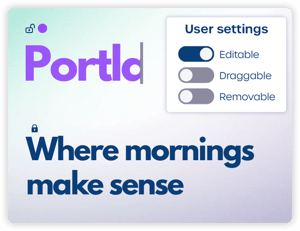
Adjust template settings for users

Save time

Spend more time on strategy instead of content requests. Build templates once, and your partners customize them whenever they need them.
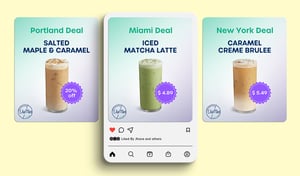
social template example

Drive local results

Marketing that reflects local communities performs better. Partners customize templates with content that resonates with their customers.
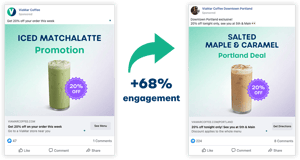
local vs generic content

Automate content creation

Your partners get error-free content every time. Marvia DNA automatically pulls in the right data based on who's using the template.
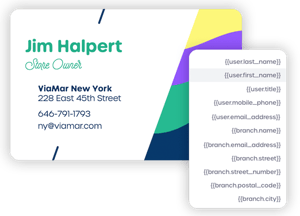
Business Card DNA

Build your way

Already have InDesign files or PDFs? Upload them and make them dynamic in minutes. Building from scratch? Use our drag-and-drop editor. Either way, you control exactly what franchisees can customize, and they see real-time previews as they work.

Flex templates drag and drop

Customize automatically

Marvia DNA knows who’s using each template and automatically pulls in their information, including addresses, pricing, imagery, and contact details. Set up user profiles once, and every template auto-populates with the correct data. No spreadsheets, no manual data entry, no errors.
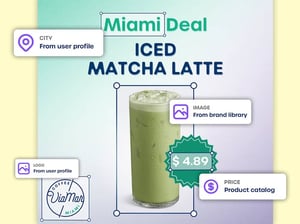
Customize automatically

Don't take our word for it

"With Marvia's Flex Templates, we can get templates out very quickly, and it helps maintain our brand standards while giving our franchisees better tools to fit their local market."
Homewell logo
Krysten FarrierSenior Designer - HomeWell Care Services

Become the next success story

While you're handling requests, New York Pizza, Nurse Next Door, and KidStrong are already creating on-brand content in a fraction of the time. See how they're freeing up the marketing team to spend their time on strategy, instead of customization requests.

Schedule a no-obligation demo to find out how.

FAQ about branded templates

Can I turn my existing InDesign files into editable templates in Marvia? Yes. Upload your tagged InDesign package to Template Studio, and the tags turn into editable fields automatically. Then set the rules: which parts partners can change and which stay locked. No coding needed. A typical file converts in about 1-2 minutes.
How does the Marvia Brand Kit keep fonts, colours, and logos correct? You set the Brand Kit up once: your brand colors, text styles like headings, paragraphs, and CTAs with the right font, size, and color, and your approved logos and images. Then you decide how much freedom partners get, element by element. Leave it open, limit partners to the Brand Kit so there are no random fonts, off-brand colors, or stretched logos Or lock it completely. You can even set what partners can change within an element: for a headline, maybe they can edit the text and pick a brand color, but not add a shadow or other effects.
Which elements can be locked, and what can local teams edit? Every element: text, images, logos, shapes, QR codes, and backgrounds. For each one, you decide what partners can do: click on it, move it, resize it, remove it, edit the content, or change the style. Turn everything off, and the element is locked. So a partner might edit the headline and pick a brand color for it, but never move the logo or touch the background.
Do I need InDesign to create templates in Marvia?

No. With Flex Templates, you build templates right in Marvia; no design software needed. You can start from scratch, or upload an existing PDF, Illustrator (AI), or Photoshop (PSD) file and build from there. Already working in InDesign? Upload your files to Template Studio instead. Either way, partners can only edit what you allow.

Can I check what partners make before it's used?

Yes. Choose who needs to approve, and partners' designs go to them before they're published, printed, or posted. You can check everything, or only the templates where it matters most, like price promotions.

What information fills in automatically? Pretty much anything you want. User and location details, images, and prices can all fill in automatically when a template opens. Need something that isn't there yet? Create your own custom DNA fields.
How are Marvia templates different from Canva templates? Canva helps you make one great design. Marvia turns it into 200 local versions, each with the right address, prices, and logo, without anyone touching a spreadsheet. Every partner's details live in their profile and fill in automatically. Partners use images from your approved DAM, designs go through approval where you want it, and the finished file goes straight to print or social.
Do we have to build all the templates in Marvia ourselves?

No. Building your own templates is easy: upload your InDesign files or create them right in Marvia with Flex Templates. Short on time, or need something more complex? Our Template Service team can build them for you.

What can partners do with a finished template? Use it right away. Download a print-ready PDF with crop marks, send it straight to a print supplier, or post it on their own social accounts, all from Marvia.