Last updated: August 19, 2026
Somewhere in your organization, a location manager is designing a flyer with last year's logo. Someone else is emailing head office to find the summer campaign images. A third person gave up searching and pulled a photo off the website.
This doesn't happen because people are careless. It happens when brand assets live in too many places, and local teams don't know which version to use.
Digital asset management, or DAM, is usually the first answer. It's a sensible place to start, and for a lot of distributed brands it solves about half the problem.
What digital asset management actually does
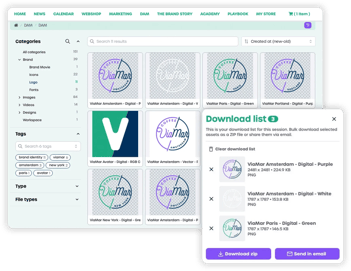 A DAM system is a central library for the files your brand relies on: logos, photography, video, print-ready artwork, presentation templates, product imagery. Instead of files scattered across shared drives, personal laptops, and old email threads, everything sits in one searchable place with version control.
A good DAM system helps people:
- Find assets through metadata and tags, without needing to understand the folder structure
- Identify the current version of a file
- Control who can view or edit different assets
- Manage usage rights for licensed photography and other time-limited content
For a single marketing team working from one office, that's usually enough. Everyone using the system understands marketing, works to similar standards, and sits in the same building.
Distributed brands have a different set of needs.
Where a standard DAM reaches its limits
Most DAM platforms were designed for central creative teams: experienced marketers who know which file they need and what to do with it once they've downloaded it.
Now roll that same system out to 200 franchisees, a dealer network across six countries, or restaurant managers with fifteen minutes between shifts to get a promotion out. The assumptions break down.
Finding the file isn't the difficult part
A restaurant manager downloads the correct campaign artwork and still can't do anything useful with it. They need their address on it, their opening hours, the offer running at their location rather than the one three towns over. A DAM hands them the artwork. It doesn't help them make it relevant.
Permissions get complicated
Central teams need location-level access, not broad role-based permissions. A franchisee in Paris needs French assets and imagery from their own location, not the full global library. Most DAM permission models weren't built for hundreds of semi-independent locations.
The people using the system aren't marketers
They're operators. If a platform takes real training, local teams skip it and ask head office instead. The request queue grows, and central marketing stays responsible for work that should have been handled locally.

Nothing governs what happens next
A DAM controls what people download, not what they do with the file afterwards. Once an asset opens in Canva, brand consistency depends entirely on the person editing it.
That leaves distributed organizations with a familiar gap. The asset library is in place, and customizing marketing materials is still slow, manual, and hard to control.
What distributed brands need alongside a DAM
Organizations that manage local marketing well treat asset management as one part of a broader system. Four capabilities need to work together.
A central asset library
Still essential. One source of truth, current versions, useful search, and a clear home for approved assets.
Locked templates
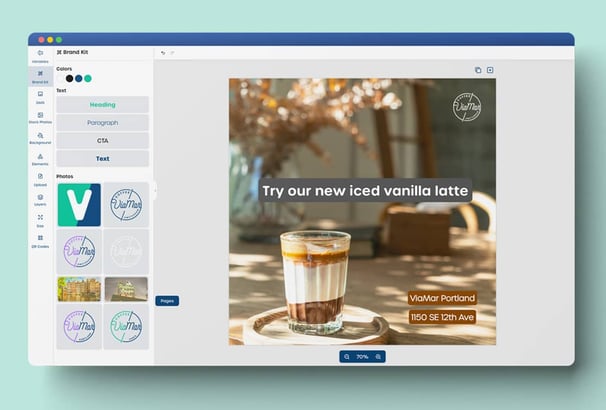
Templates keep brand-critical elements fixed while local teams edit the details that apply to their location. A manager adds an address or changes a local offer. The logo stays put, and the typeface stays the same, because those fields aren't theirs to change.
Simple local editing
Local teams should produce an on-brand poster or social post in a few minutes, without design experience or a call to head office. The first-use test is straightforward: can someone create the right output on their first attempt, unaided?
Approval workflows
Some materials can be published as soon as a location has customized them. Others need review first, particularly where legal claims or regulated information are involved. Central marketing sets those rules per content type rather than checking everything or nothing.
When these work together, locations create what they need, and the central team keeps control of the brand.
What this looks like in practice
A franchise brand with 150 locations launches a seasonal campaign. Central marketing builds the templates once. Each franchisee opens their version with their address and opening hours already filled in, adds the local offer, then prints or publishes it. Head office sees what's been created and where.
A dealer network launches a new model. Manufacturer marketing controls the artwork and the legally required claims. Dealer contact details populate automatically, so the only thing left to add is pricing, and the fixed content stays protected.
A multi-location retailer opens a new store. Rather than assembling the launch materials piece by piece, the store manager orders a ready-made opening kit: signage, window graphics, social assets, and local ads, all personalized to that location and approved in advance. Nobody rebuilds anything from scratch.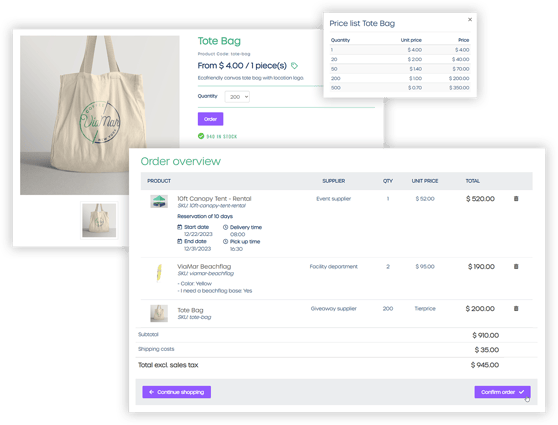
In each case, the asset library does the necessary work in the background, providing the approved building blocks. The bigger gain comes from giving local teams a controlled way to use them.
fit20 - 159 locations
Read the fit20 story →
Where Marvia fits
Marvia is a brand-to-local marketing platform for distributed organizations. The asset library works alongside templates, customization controls, and approval workflows, so local teams find the right file and use it correctly in the same place.
Before choosing a DAM, look at what happens after someone downloads an asset. If they still need to ask head office for help, open a separate design tool, or guess which elements they're allowed to change, the library hasn't solved the full workflow.
A DAM gives your organization one source of truth. A brand-to-local platform turns that source of truth into marketing your locations can actually use.
→ See how digital asset management works in Marvia